I am writing a small compiler using ANTLR 3.0. When I debug it, I get numerous first chance exceptions. With each exception, a messages is displayed in the Output window and the program breaks into the source code, which becomes quite annoying and time-consuming. The exceptions are thrown and handled by ANTLR to detect which branch of the lexer or parse rule to proceed. In most cases, I don’t need to worry about them.
How can I get rid of the messages and prevent the control from breaking into the code?
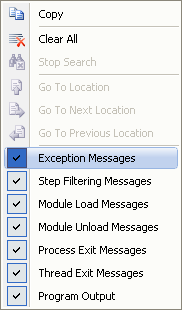
To get rid of the messages while debugging, right click in the Output window, and in the context menu, uncheck in the menu item “Exception Messages”.
To prevent the control from breaking into the source code when an exception is thrown, open the Exceptions dialog by selecting the Debug – Exceptions menu item, add the exception types to the Exceptions dialog, make sure the Thrown and User-unhandled flags for the exceptions are unchecked. In the screen shot below, two exceptions that are thrown by ANTLR are added under the Common Language Runtime Exceptions.


 Crafting Beautiful Code
Leave a comment